
Monday afternoon. Jozo wanted a newsfeed on our website. Not a blog—we already have one. A curated collection of AI content. Videos, talks, interviews. The stuff our team actually watches to stay current.
"Can we have it by end of day?"
Two hours later: 11 pieces of content. Working recommendations. Live on the site.
Here's what actually happened.
The Challenge: Information Overload
Every week, dozens of important AI videos drop. Stanford lectures. Founder interviews. Technical deep-dives. Industry analysis.
Our team was watching them individually. Sharing links in Slack. Losing track of what we'd covered.
The problem wasn't finding content. It was organizing it.
We needed a central place where:
- Curated AI content lives permanently
- Each piece has context (why it matters, key takeaways)
- Related content surfaces automatically
- Anyone on the team can discover what they missed
Traditional solutions meant weeks of planning. Content management systems. Editorial workflows. Scheduling tools.
We didn't have weeks. We had an afternoon.
The Solution: AI-Assisted Rapid Building
Instead of building a content platform, we built a knowledge bank.
The approach was simple: Start with one video. Make it work. Then scale.
What We Built
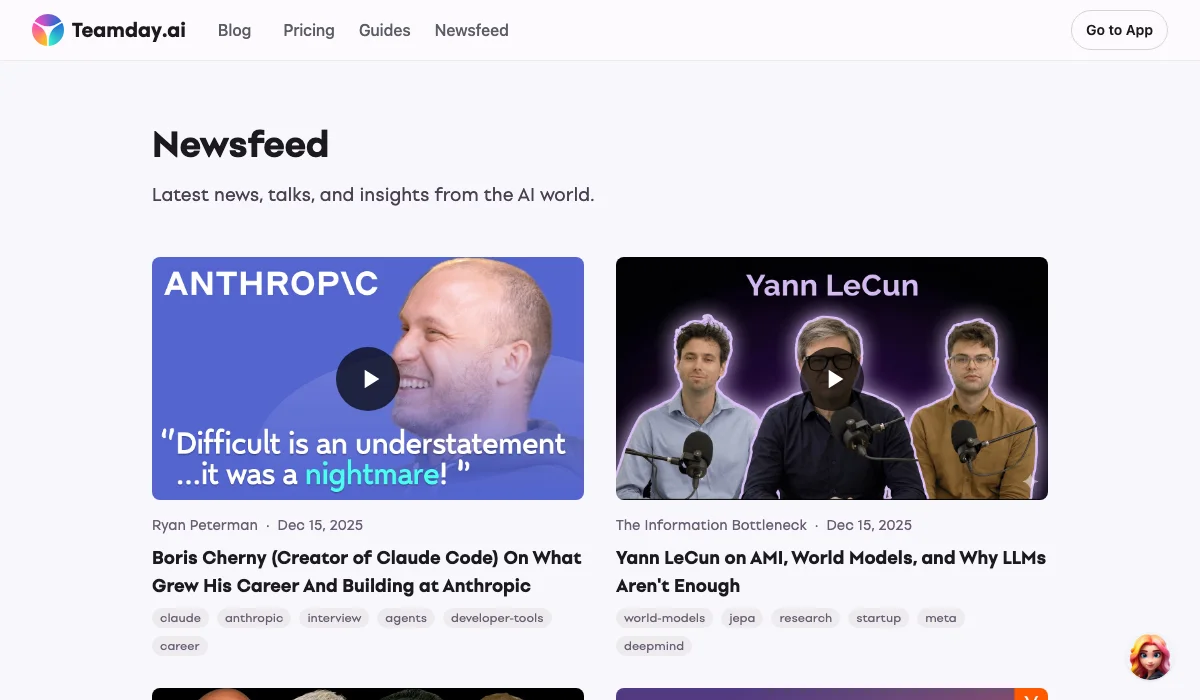
- Curated Feed at /ai/ — A chronological list of AI content we recommend
- Rich Context — Each video has a "Perspective" section explaining why it matters and key takeaways
- Intelligent Recommendations — Related articles surface based on actual content similarity, not just tags
- Transparent Matching — Users see why articles are related ("87% match" vs "52% match")
How We Did It
Claude handled the heavy lifting:
- Transcript extraction — Pull the full text from any YouTube video
- Perspective generation — Analyze the transcript and write genuine insights
- Parallel processing — Add multiple videos simultaneously using AI subagents
- Recommendation engine — Calculate content similarity and surface related pieces
No code rewrites. No new frameworks. Just AI filling the gaps.
The Experience: What It Was Actually Like
The first video took about 15 minutes. Stanford CS230 on AI agents. We pulled the transcript, generated a perspective, added it to the feed.
Then we hit our first real problem: the video wouldn't embed. Stanford disabled external embedding.
Instead of giving up, we built a fallback. Embed-disabled videos show a thumbnail with a "Watch on YouTube" overlay. Users know exactly what they're clicking.
Problem solved in 5 minutes.
Scaling Up
Once the pattern worked, we added videos in parallel. Jozo kept dropping YouTube links:
- Demis Hassabis interview with Axios
- Jensen Huang on AI infrastructure
- Peter Diamandis breaking down GPT 5.2
- Yann LeCun on world models
- Boris Cherny on building Claude Code
- Rio Lou on designers becoming coders
Six AI agents working simultaneously. Each one:
- Fetching the transcript
- Generating a perspective
- Creating the content entry
Result: 6 videos processed in the time it would take to do 1 manually.
The Transparency Insight
Halfway through, Jozo asked about the "Related Articles" section.
"Why are these articles showing up? What's the connection?"
Standard practice would be to hide the algorithm. Just show recommendations and trust users to click.
We did the opposite. We added match percentages.
- 87% match — Highly related topics
- 52% match — Connected, still relevant
- 34% match — Tangential, might be interesting
Users see why we're recommending something. No black box. No mystery algorithm.
Turns out, transparency builds trust. Even when the matching isn't perfect.
What We Shipped
By end of day, the newsfeed was live at teamday.ai/ai.
11 curated videos covering:
- Stanford courses on transformers and agents
- Founder interviews (Hassabis, Huang, Brin)
- Industry analysis (GPT 5.2 breakdown, AI competition)
- Technical debates (LeCun vs DeepMind on understanding)
- Career insights (Claude Code creator, Cursor's design lead)
Each video includes:
- AI-generated perspective on why it matters
- Key takeaways for quick scanning
- Channel links for discovering more
- Related content with transparent matching
Zero editorial workflow. Adding new content means creating a markdown file. That's it.
Key Takeaways
1. Start with one, then scale
Don't build the platform first. Make one piece of content work perfectly. The pattern becomes clear. Scaling is the easy part.
2. Let AI fill the gaps
We didn't learn video editing or build recommendation engines. We used AI to handle what we couldn't do quickly ourselves. The result was better than if we'd done it manually.
3. Transparency beats mystery
Showing match percentages felt risky. What if users question low matches? Turns out, they appreciate knowing why content is recommended. Trust comes from honesty, not polish.
4. Parallel work changes everything
One person adding videos sequentially = slow. Multiple AI agents working in parallel = fast. The same principle applies to any repetitive knowledge work.
5. Good enough ships, perfect doesn't
The newsfeed isn't perfect. Some perspectives could be deeper. Some matches could be tighter. But it's live. It's useful. It's being used.
Done beats perfect.
What's Next
The knowledge bank is live and growing. We're adding new content weekly—talks, interviews, research breakdowns.
Want to see it? Check out the AI Newsfeed
Building something similar? The pattern works for any curated content:
- Industry news feeds
- Research libraries
- Training resources
- Competitive intelligence
The key insight: AI doesn't just write content. It organizes, connects, and surfaces it.
That's the future of knowledge work.
P.S. — We added one more video during the session: Rio Lou from Cursor talking about turning designers into coders. His main point? AI fills the implementation gaps so people can focus on what they're good at. Exactly what we experienced building this newsfeed.