
APP BUILDER
Any app you can describe. Built while you watch.
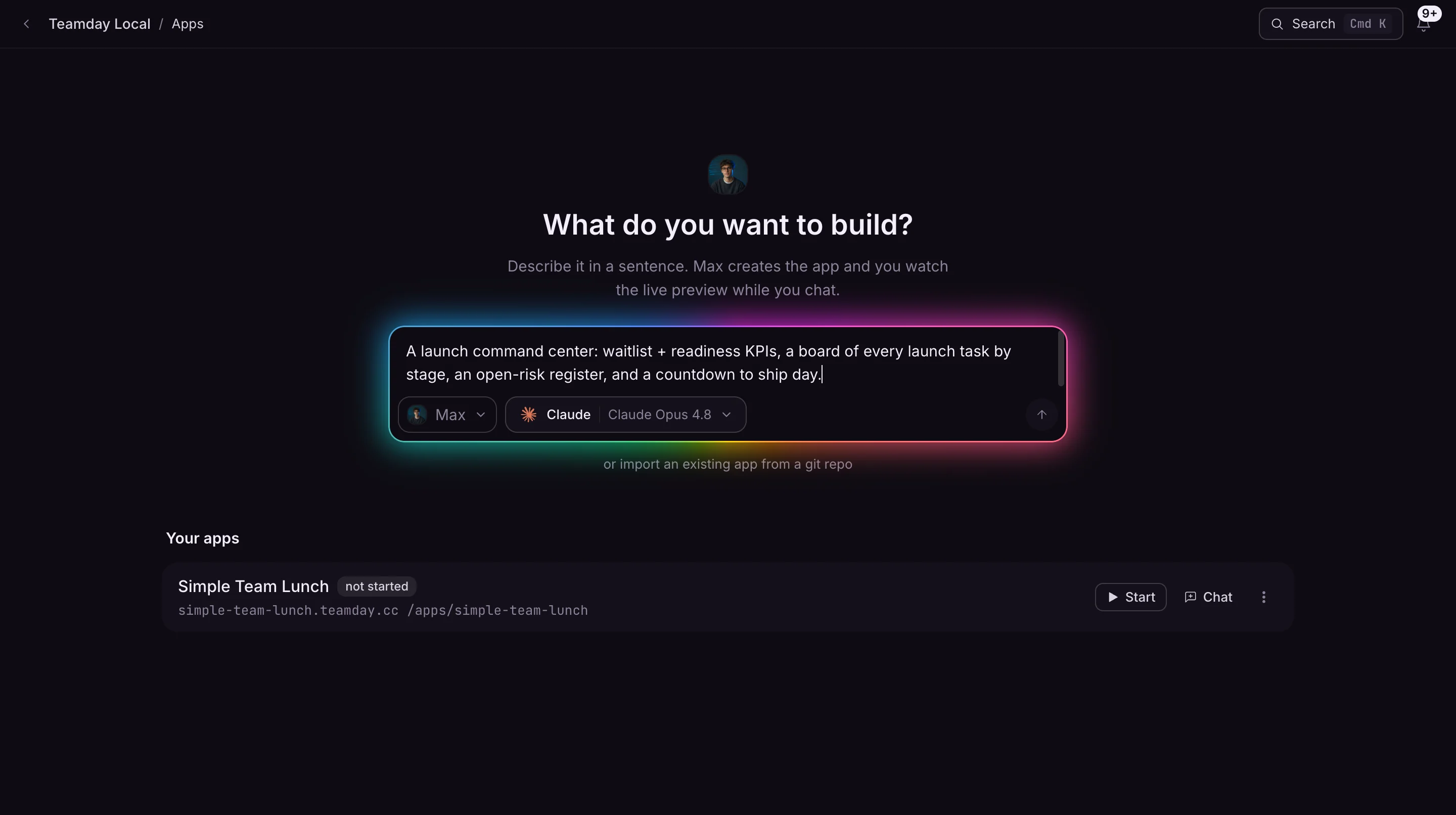
Type what you need in one sentence. An AI engineer writes the real code and a live preview takes shape beside you — you watch, say what to change, and it adjusts on the spot. Publish when it’s right.
THE LOOP
From a sentence to a shipped app
No setup, no boilerplate, no deploy pipeline. The whole thing happens in one chat with a live preview beside it.
Describe it in a sentence
Type the app you need — "a tool where the team proposes lunch spots and votes on today’s pick", or "an intake form that files leads into our pipeline". A workspace and a live preview spin up in seconds.
Watch it build itself, live
An AI builder writes the actual code and the preview hot-reloads as it goes. Don’t like something? Say so in chat. It edits, restarts, and shows you the result. If a build breaks, one click sends the error back to fix.
Publish to a live URL
Flip to published and your app gets an always-on public address. Or keep it private behind your workspace login. Rename, restart, or unpublish any time — no deploy pipeline to babysit.
BUILT LIVE
A real app, built through Teamday — and verified running
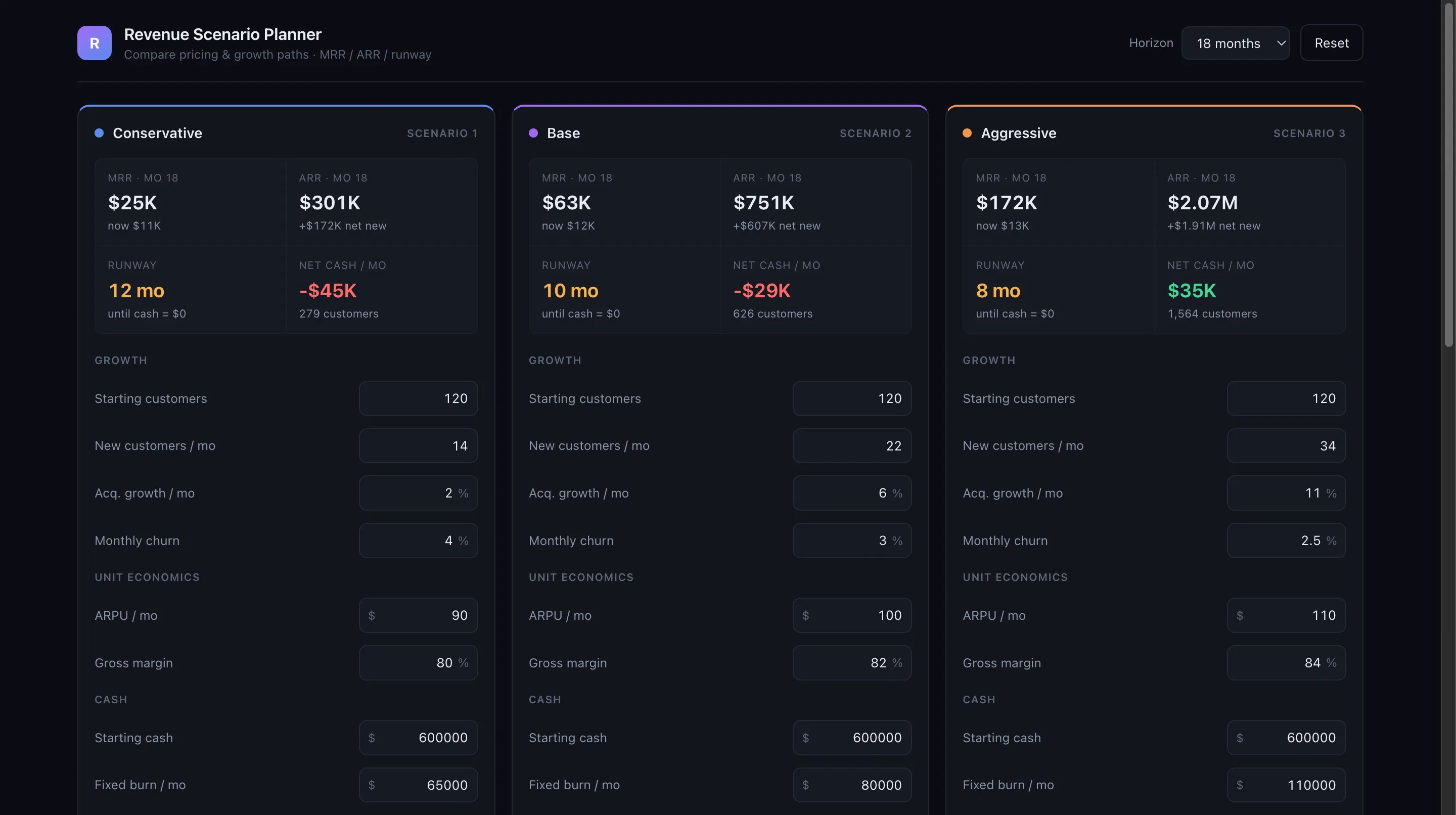
This isn’t a design mockup. The Revenue Scenario Planner was built through the App Builder, recovered from a stale preview, and republished to its own URL. On 2026-07-13 we re-checked it unauthenticated and it was serving.
Revenue Scenario Planner
A three-scenario financial model — Conservative, Base, and Aggressive — projecting MRR, ARR, runway, and net cash live from editable growth and unit-economics inputs.
Safe to open: the math runs in your browser, inputs stay in local storage, and it calls no external service.
Re-verified 2026-07-13: an unauthenticated request to the page and each source asset it needs (/, src/main.ts, src/model.ts, src/styles.css) returned HTTP 200.
Open the live appBuilt through the App Builder as a standalone workspace app, then recovered and republished through Teamday. One dated operating receipt, not a case study: it does not measure adoption, revenue, or speed.
WHY IT'S DIFFERENT
A prototyper builds toys. This builds real software.
Most AI app builders hand you a standalone demo. Teamday apps are full-stack, can use a connected database, and are connected to the AI team already running your business.
Real full-stack apps, not mockups
Generated apps are genuine codebases — React/Vite or Next.js front ends, an Express or Bun back end, error states and persistence. Real software you can keep, not a throwaway prototype.
Connect a scoped database when the app needs one
Use an organization-owned Postgres connection for schema, migrations, seed data, and server-side persistence. Teamday exposes only the explicitly configured app database secret to the preview.
Wired into your AI team
This is the difference. Apps can call your Teamday agents, missions, chats, and workspace data through the built-in API. Build a tool that kicks off a campaign or reads your company’s own data, not just a standalone toy.
Iterate by talking, not configuring
Every change is a sentence. "Add a CSV export." "Make the chart weekly." "Gate this behind login." The builder edits the code and you see it live — no settings panels, no glue code.
Shareable in one toggle
Publish to a public web address your team or customers can open immediately, or keep it private to your workspace. Always-on when public; quietly idles when private to stay out of the way.
Bring your own repo, too
Prefer to start from existing code? Import a GitHub repo, a workspace folder, or any Git URL. The same chat-and-preview loop runs on top of your project, package manager auto-detected.
WHAT YOU CAN BUILD
The apps your team never had time to build
Internal tools
Approval queues, intake forms, on-call rotations, status boards — the small apps your team always needs and never has time to build.
Live dashboards
Point a Vite front end at your Postgres data and ship a reporting view with filters and CSV export — refreshed, not a screenshot.
Polls & decisions
Propose-and-vote apps, surveys, and lightweight scheduling — collect input from the team and show the result in real time.
Customer-facing micro-apps
Calculators, configurators, sign-up flows, and waitlists on a public URL — published the moment they’re ready.
Data explorers
Searchable, filterable UIs over a table — schema inspected and queried for you, bound to a clean interface.
Workflow triggers
A form or button that calls your Teamday agents and missions — turn an idea into an action your AI team picks up.
FAQ
Questions, answered
Do I need to know how to code?
No. You describe what you want in plain English and the AI builder writes the code. But it is producing real software, not a locked no-code template — so if you do read code, everything is there, editable, and yours.
How is this different from Lovable, v0, or Bolt?
Teamday apps are born inside the same workspace as your AI employees: they can call agents and missions, use approved company data, and live next to the team that operates the business. The app is part of the company workspace, not an isolated generation session.
Can the app store data?
Yes. An app can use local development persistence or an organization-owned Postgres connection. Database access stays server-side, and the preview receives only the explicitly configured app database secret.
What can the generated app actually do?
Full-stack web apps: a React/Vite or Next.js front end, a real back end, optional persistence, and approved external APIs connected with server-side credentials. It can also use Teamday’s API to read permitted workspace data and trigger agents and missions.
Can other people use what I build?
Publish it and the app gets an always-on public web address anyone can open. Keep it private and only your workspace can reach it behind login. You toggle between the two at any time.
What if a build breaks?
The preview shows you what went wrong, and one click hands the error and logs back to the builder to fix. You iterate in the same chat until it runs — no separate debugging environment.
Describe your first app now.
One sentence is enough. Watch an AI engineer build it, live, and publish it when it's ready.
Get started