
Start with the output you need: plain text, a reconstructed document, or verified fields. Granite Docling is a compact candidate for structured conversion. PaddleOCR-VL, LightOnOCR and DeepSeek-OCR are other document-parsing families to evaluate on your own pages. None makes invoice validation disappear.
Checked October 31, 2026. We ran Granite Docling 258M on one synthetic invoice using a Linux CPU, then reused the exact image for Granite and LightOnOCR-2-1B on Mac MPS. Downloadable inputs and raw outputs make those runs inspectable. PaddleOCR, LightOnOCR-3 and DeepSeek-OCR-2 remain untested candidates.
Which models belong on a document shortlist?
| Exact checkpoint | Reason to evaluate it | Output/interface detail | Declared weights license | Tested here? |
|---|---|---|---|---|
| ibm-granite/granite-docling-258M | Compact document-conversion experiment | Produces DocTags; Docling can convert these to other formats | Apache 2.0 | Same invoice, Linux CPU and Mac MPS |
| PaddlePaddle/PaddleOCR-VL-1.6 | A document-parsing pipeline with a current versioned interface | Official example selects pipeline_version="v1.6" | Apache 2.0 | No |
| lightonai/LightOnOCR-3-4B | Page transcription plus visual grounding | Distinguishes empty-prompt transcription from grounding output | Apache 2.0 | No |
| lightonai/LightOnOCR-2-1B | Smaller previous-generation alternative | Model card includes a Transformers path using Apple MPS | Apache 2.0 | Same invoice, Mac MPS |
| deepseek-ai/DeepSeek-OCR-2 | Another document-to-text/Markdown candidate | Uses its documented model-specific inference path | Apache 2.0 | No |
Sources: linked official cards and Hub metadata as of 2026-10-31. This is a deployment shortlist, not an accuracy ranking. We name checkpoint versions deliberately: LightOnOCR-2 is a smaller older candidate, not the latest generation, and the first DeepSeek-OCR release has different license metadata from OCR-2.
LightOnOCR-3's card distinguishes transcription from a grounding mode that includes element labels and coordinates. Paddle's example is a pipeline, not just a generic image captioner. Granite's DocTags carry document structure, so reading only a plain-text decode discards part of its intended output. Match the output interface to what your next processing step actually consumes.
Our local sample: a clean invoice with known values
We generated a simple English invoice from scratch. It contains invented company data, two line items, an invoice identifier and a due date. No customer document or financial record was used.
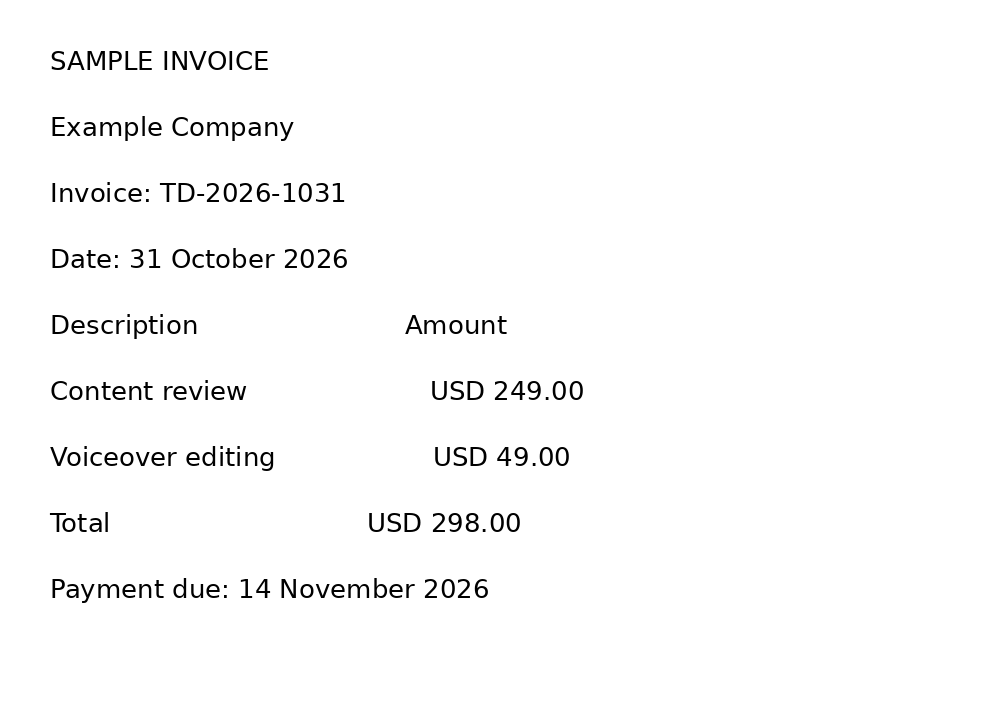
Download the input image and inspect the raw DocTags output.
We prompted the pinned checkpoint with Convert this page to docling. and decoded up to 1,024 new tokens, without sampling. This is the model's structured-conversion path, rather than a prompt asking it to invent a JSON schema.
| Exact expected string | Present in raw output? |
|---|---|
TD-2026-1031 | Yes |
249.00 | Yes |
49.00 | Yes |
298.00 | Yes |
14 November 2026 | Yes |
Measured 2026-10-31 on an AMD Ryzen 9 3900 Linux host, four CPU threads, float32. The first inference took 542.56 seconds (about nine minutes) and generated 317 tokens, below the 1,024-token cap. No truncation was observed. Aggregate peak process RSS was 2116.0 MiB. Downloads and model loading are excluded; this was not an optimized throughput test.
All five checked strings survived. The output represents the invoice as positioned text elements; it is not a validated invoice JSON record or proof of correctly reconstructed table cells. The elapsed time also shows why a small parameter count alone is not a promise of fast CPU document processing. See the full settings and raw result.
These checks ask whether exact expected strings survive in the raw output. They do not verify that each amount has been assigned to the correct field or table cell. A complete parser test also needs to inspect associations, reading order and missing content. One clean synthetic page cannot support a claim about real invoice accuracy.
Mac mini follow-up: two parsers on the identical invoice
We reused the exact committed PNG above, without regenerating it or changing fonts. On October 31, 2026, an Apple M6 Mac mini, 32 GB unified memory, macOS 27.0.1 ran both checkpoints in float32 on PyTorch 2.14.1 MPS, Transformers 5.20.2, with SDPA, greedy decoding and a 1,024-token cap. Granite uses the original pinned revision and Docling prompt; the smaller previous-generation LightOnOCR-2-1B, revision be7c41313c30e940fe5571de59e5fabc779e00c8, uses its documented LightOnOcrProcessor / LightOnOcrForConditionalGeneration interface and an image-only transcription prompt. This does not test LightOnOCR-3.
| Mac MPS checkpoint | Median generation | Timed range, n=3 | Tokens per run | Cap hit? | Five expected strings present? |
|---|---|---|---|---|---|
| Granite Docling 258M | 30.43 s | 30.09–30.45 s | 317 | No | Yes, all three runs |
| LightOnOCR-2-1B | 6.02 s | 5.90–6.12 s | 185 | No | Yes, all three runs |
A complete separate warm-up preceded each model's three timed runs: Granite's first generation took 32.21 seconds; LightOn's took 6.70 seconds. The timer covers model.generate and MPS synchronization, excluding preprocessing, output decoding/saving, loading and downloads. Granite's image preprocessing uses the PIL backend; LightOn uses Pixtral's image processor with Torchvision. This is a different accelerator/runtime environment from the Linux first-inference observation, not a measurement of the machine alone. The two parsers also emit different output formats and token counts, so their times are not equal-work throughput scores.
Value presence and correct associations are separate checks. We inspected the original image and raw results. Granite places Content review / USD 249.00, Voiceover editing / USD 49.00 and Total / USD 298.00 on matching row coordinates. The invoice ID and due date remain inline with their labels. Its DocTags are byte-identical across all three Mac runs and to the preserved Linux raw output, ending normally at 317 tokens; they still describe positioned text rather than explicit table cells.
LightOn's raw output uses a closed HTML table: each description and its correct amount share a row, including Total / USD 298.00. The invoice ID and due date remain correctly labeled outside it. Its three raw outputs are also byte-identical, with a model end marker after 185 tokens. No truncation or unclosed table was observed on this fixture. This is editorial inspection of one clean page, not independently validated invoice-schema extraction or a representative accuracy estimate. Checking 49.00 alone would be insufficient because that substring also occurs in 249.00.
Inspect Granite raw DocTags, LightOn raw output and the separate field-association review. Granite settings/results and LightOn settings/results retain every run, fixture checksum and package inventory. Sampled process-tree physical-footprint peaks were 3.202 GiB and 5.584 GiB respectively; these are not minimum memory requirements. Resource snapshots retain macOS RSS/footprint and end-of-run MPS allocation as distinct metrics.
The first Mac setup attempts lacked Pillow for Granite and Torchvision for LightOn; both stopped before inference and were corrected only in the isolated environment. LightOn's retry follows the card's explicit model/processor classes because the checkpoint metadata otherwise selects generic Pixtral/Mistral3 auto classes. These setup failures contribute no OCR score or inference timing. The original Linux evidence and links remain intact.
The three tasks hidden inside “OCR”
Text recognition recovers characters. It should preserve a decimal point, minus sign, account number and date. For a scanned letter, that may be most of what you need.
Document parsing adds structure: headings, paragraphs, table cells, reading order and sometimes bounding boxes. A page can contain all the right words in the wrong order. For a multi-column report or table, that is still a bad conversion.
Field extraction maps the result to something your application can use: invoice_number, currency, subtotal, tax, total, due_date. Correctly reading 298.00 does not prove it is the total rather than a line-item amount. Keep source evidence with each extracted field so a reviewer can check the assignment.
Before deploying a vision model, inspect whether a PDF already contains usable text. Rasterizing a clean digital PDF can add unnecessary work. Use a small representative sample to decide which pages need OCR and which can follow a simpler text-extraction path.
Evaluate with documents that expose expensive errors
Build a held-out collection from the layouts and languages your company actually receives. Include scans, photos, skewed pages, faint text, multi-page documents and tables split across pages. Keep image preprocessing consistent when comparing models, and record the page resolution.
For an invoice task, manually label identifiers, currency, amounts and dates. Score exact field matches separately from general text accuracy. Treat a missing value as missing rather than asking a model to complete it from context. An attractive Markdown page with a wrong bank account or total is a failed extraction.
Then add deterministic checks. For example, line items plus tax should reconcile with the total according to the document's rounding convention. A contradiction should produce a review flag, not an automatically “corrected” number. Keep the original image available beside the extracted record.
For tables, evaluate row and column associations. A text-level score may reward a parser that captured every number while moving them into the wrong row. For long documents, check the final pages as well as the opening page; token limits and truncation can silently remove content.
Hardware and cost: count reviewed pages
Our CPU sample times the first model-generation call only. Image preprocessing, final token-to-text conversion, model downloading and loading are excluded. It does not measure sustained pages per second. Running a larger checkpoint, higher-resolution pages or more output tokens changes both memory and elapsed time. A publisher's GPU throughput number is not a CPU prediction.
For a real pilot, measure the full path from uploaded page to a reviewed structured record. Include PDF rendering, OCR, parsing, validation and retries. Report the share of documents requiring correction and the time needed to correct them. The useful cost is cost per accepted document, not just cost per raw page.
These are external models, not a claim that Teamday ships a specific OCR integration. For related ingestion work, compare Hugging Face speech recognition. For generated media, see TTS models with local samples and self-hosted video models.
Checkpoint revision and license-metadata snapshots, retrieved 2026-10-31.