
Want product shots, social images or quick edits without paying per image or sending files to a cloud service? Downloadable image models can now do that on an ordinary desktop. We ran five of them on a Mac mini with the same prompts to see which one is worth installing.
Start with FLUX.2 Klein 4B. It was the fastest model by a wide margin, at 15–16 seconds per 1024×1024 image; no other model finished in under 41. It also does instruction edits, and its Apache 2.0 license allows commercial use. Z-Image Turbo is the second pick: also Apache 2.0, the lowest memory use we measured, and the most accurate landmark in our poster test. It takes 41–49 seconds per image.
The five models, ranked for local use
| # | Model | Time per 1024×1024 image | Peak memory | Download (4-bit) | License | Good for |
|---|---|---|---|---|---|---|
| 1 | FLUX.2 Klein 4B | 15–16 s (edit: 30 s) | 8.2–10.7 GiB | 4.3 GiB | Apache 2.0 | Fast drafts, product shots, edits |
| 2 | Z-Image Turbo | 41–49 s | 5.5 GiB | 5.5 GiB | Apache 2.0 | Smaller machines, real places, text |
| 3 | FLUX 3 Image Klein | 58 s | 10.9–11.9 GiB | 5.0 GiB | FLUX Kommunity (restricted) | Material detail, if the license fits |
| 4 | Qwen Image 2.1 Turbo | 46–47 s | 6.9 GiB | 9.9 GiB | Research/evaluation only | Testing, not commercial work |
| 5 | FLUX.1 Schnell | 43–44 s | 8.7 GiB | 9.0 GiB | Apache 2.0 | Nothing FLUX.2 Klein doesn't do faster |
Measured October 25, 2026 on an Apple M6 Mac mini (12-core GPU, 32 GB memory) with mflux 0.23 and 4-bit community weights. One run per prompt; time includes starting the process and loading the model, not the download. No run added swap. Licenses re-checked on Hugging Face on November 13, 2026.
The ranking weighs three things a business user feels: how long you wait, whether you may use the output commercially, and whether the image followed the prompt. Two prompts can't rank image quality finely, so where the pictures were close we say so rather than invent a gap.
What each model did with our prompts
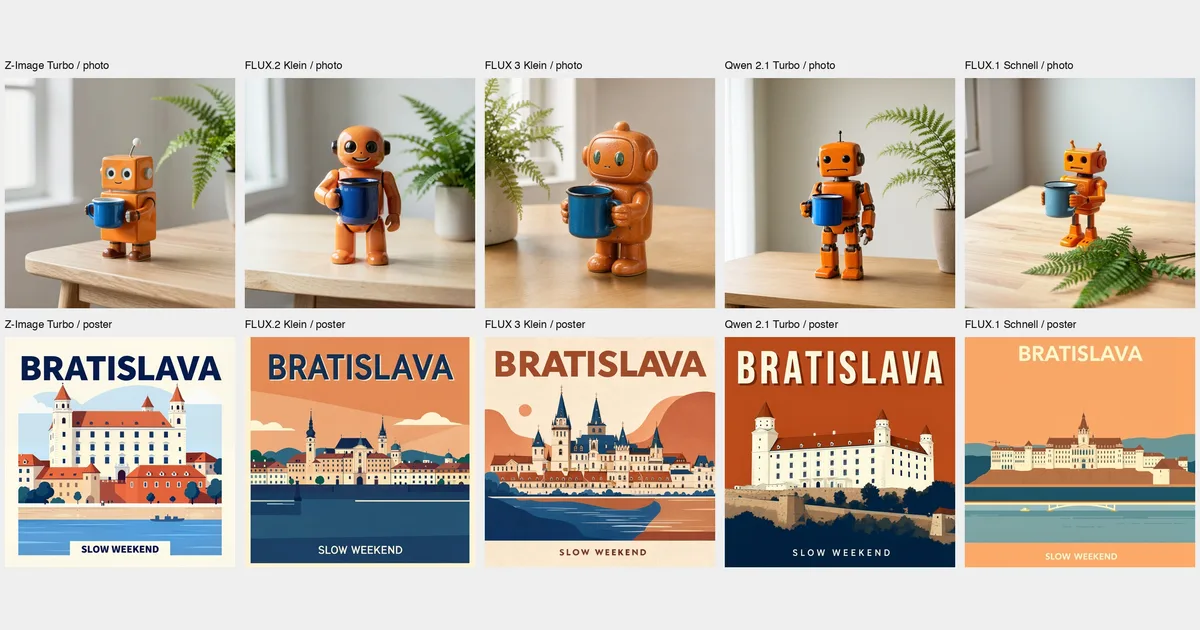
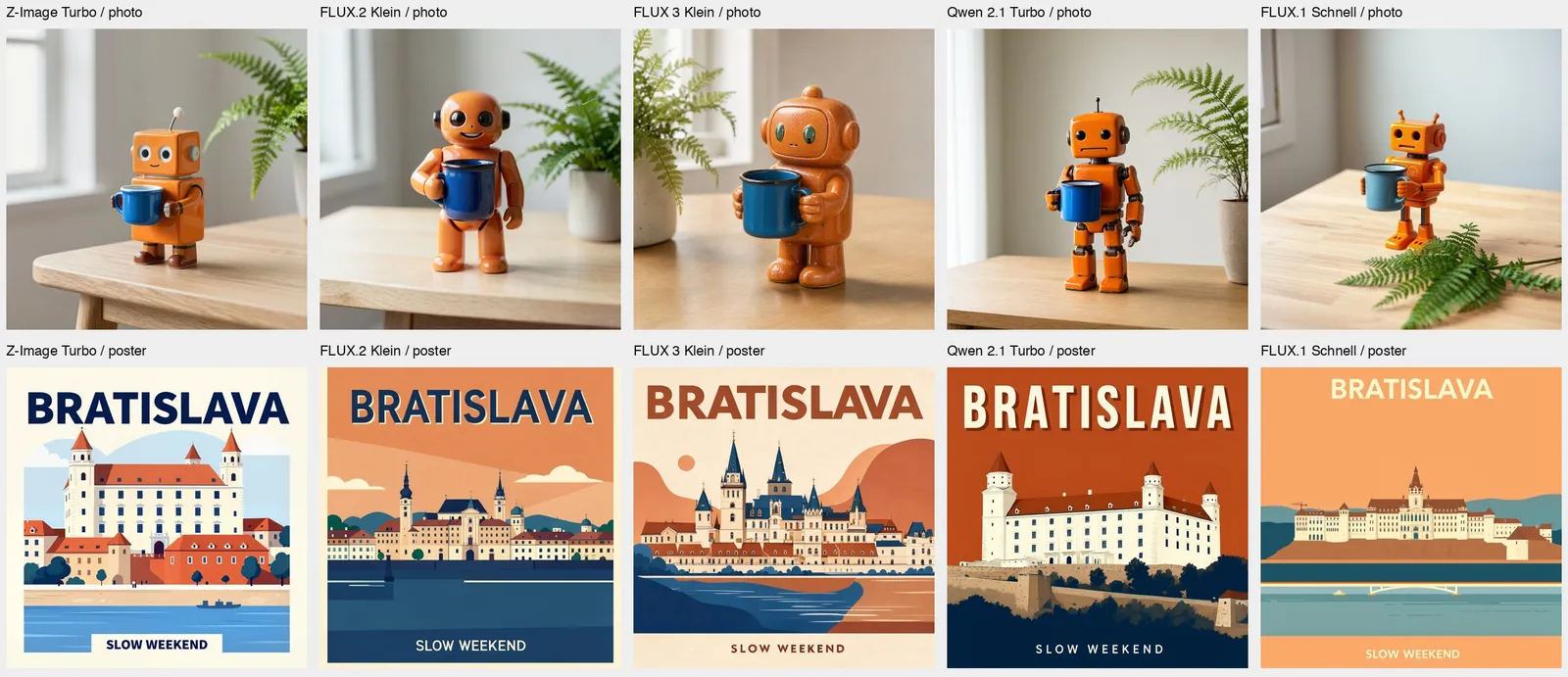
We used two prompts. The first was a product photo: a small orange ceramic robot holding a blue enamel mug on a pale oak table beside a green fern, soft window light from the left. The second was a flat travel poster of Bratislava Castle above the Danube, with the exact headline "BRATISLAVA" and the small line "SLOW WEEKEND". The poster tests text, layout and whether the model knows a real place.
FLUX.2 Klein 4B made a clean, believable product photo with a glossy ceramic robot, in 16 seconds. Both poster lines were spelled correctly, but the building was a generic ornate palace, not Bratislava Castle. If you need a specific real landmark, give it a reference image.
Z-Image Turbo drew the most recognizable castle, the white four-towered block, and put the Danube under it. Its robot was boxier, with complete anatomy and clear ceramic texture. It peaked at only 5.5 GiB of memory, the lowest of the five, so it is the better bet on a 16 GB machine. The trade-off is 41–49 seconds per image.
FLUX 3 Image Klein had the richest ceramic surface and clean hands, and it spelled both poster lines correctly, but its castle was invented too. It was the slowest model at 58 seconds with 16 steps. Its model card says it expects long scene descriptions and pairs it with a separate 9B prompt-expansion model. We sent our prompts as written, so a full-caption workflow may do better than this.
Qwen Image 2.1 Turbo also produced a recognizable Bratislava Castle, but it left out the river we asked for. Its robot had exposed mechanical joints rather than a ceramic body. Its license rules it out for most business use anyway.
FLUX.1 Schnell got every object and both text lines right. It is the 2024 model in this group, and it took 43 seconds for the same four steps FLUX.2 Klein finished in 16. There's no reason to choose it for new work.
Editing an image locally
FLUX.2 Klein also edits from an instruction, which covers a lot of everyday work: changing a product color, swapping a background, making variants. We asked it to change only the robot's body from orange to turquoise and keep everything else.
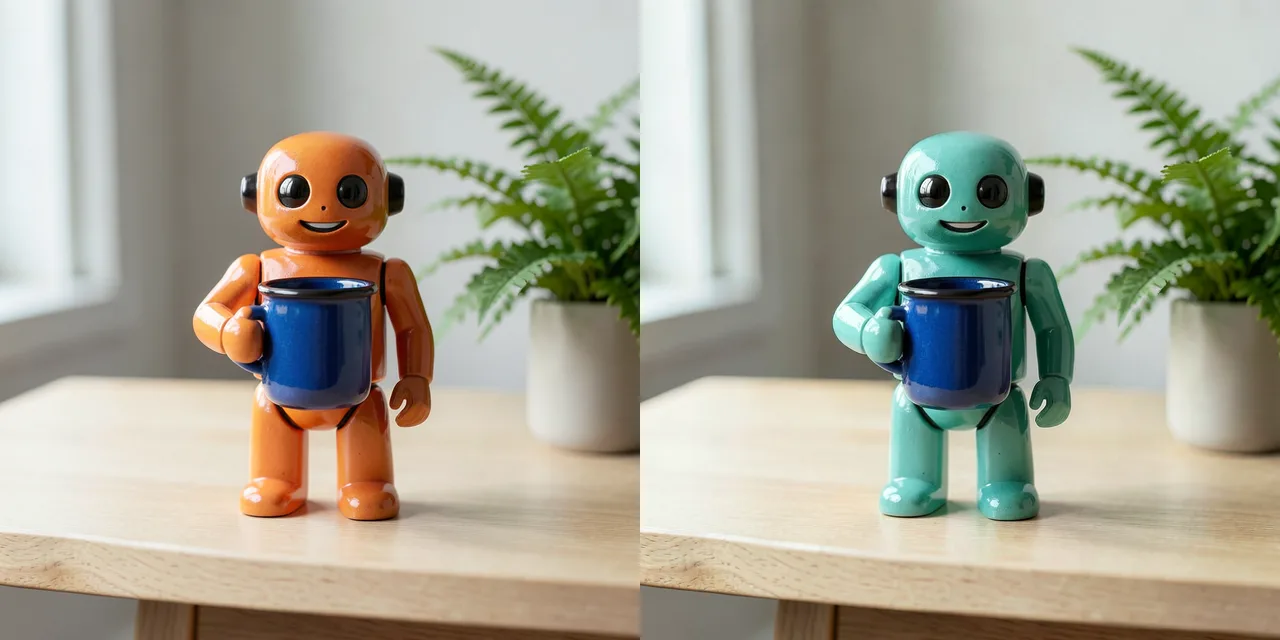
The edit took 30 seconds and peaked at 10.7 GiB. The color changed and the mug stayed blue, but the scene was not preserved exactly: the robot came out slightly larger and shifted, with small changes to its face. That is fine for a variant or a mockup. For a catalog image where every pixel has to match, check the result carefully.
Can your computer run these?
Our numbers come from 4-bit versions. Shrinking the stored weights to 4 bits cuts download size and memory, and it can cost some quality; we did not compare against full precision. All five peaked well under the 32 GB in our Mac, and none needed swap.
On a Mac, the software matters as much as the model. Through ComfyUI on the same Mac, the full-precision Z-Image Turbo took 19 minutes for one 1024×1536 image. The 4-bit MLX version through mflux took about 40 seconds. Start with an MLX build if you have Apple silicon.
On a Windows or Linux PC with an NVIDIA card, use the official releases. Black Forest Labs lists about 13 GB of VRAM for FLUX.2 Klein 4B, and Tongyi says Z-Image Turbo fits in 16 GB. Our Mac timings don't predict GPU speed.
Check the license before you build on one
A model you can download is not automatically a model you can sell work from. As listed on Hugging Face on November 13, 2026:
- FLUX.2 Klein 4B, Z-Image Turbo, FLUX.1 Schnell: Apache 2.0.
- FLUX 3 Image Klein: gated access and the FLUX Kommunity License. Non-commercial use, plus commercial output for qualifying users with under US$5M in gross annualized revenue. It is a separate open model from BFL's hosted FLUX 3 Image.
- Qwen Image 2.1 Turbo: non-commercial, "for research or evaluation purposes only", unless you get a separate license from Qwen.
Newer models we haven't tested
- MiniMax H3 Image (released November 3) topped Hugging Face's trending text-to-image list when we checked on November 13. Its transformer has 33.1B parameters and is 66 GB in BF16, plus a 66.7 GB text encoder, so it is not a casual desktop install. Its license excludes the EU, the UK, South Korea and the US, and requires separate authorization above US$1M in annual revenue.
- Ideogram 4 has downloadable weights under a license Hugging Face lists as "ideogram-4-non-commercial".
- Krea 2 Turbo uses a Krea community license and gated access.
None of these were part of our same-prompt test, so we don't rank them.
Local or hosted?
Run locally when you make many images, want to keep files on your own machine, or want to fine-tune on your own products. Expect to spend time on setup and on waiting for slower models.
If you need a handful of polished images, a hosted model is simpler. Our hosted image model ranking compares GPT Image, Nano Banana, Seedream and others with prices. Teamday's image studio runs hosted models such as GPT Image 2, Seedream and FLUX.2 [flex]; it does not run the local checkpoints above. Try your prompt on hosted models →
For moving pictures, see what happened when we ran downloadable video models on the same Mac.